Recoil is not random. Most weapons climb in the same direction at roughly the same rate, which means the correction is something you can write down: click, wait, move down a little, repeat. A macro turns that correction into the same input every time you hold the trigger.
This page covers the mechanics, the numbers, and the limits. It is written for BuffKey's macro editor, but the same ideas apply to any input-level macro tool.
Check the game's rules first
Some games and tournaments do not allow macros or tools that press buttons for you. BuffKey is an input tool, not an exemption from those rules. Test in a single-player mode, and only use a macro online where it is allowed.
What a recoil control macro actually does
A recoil loop is a short command list that repeats while you fire:
Mouse Click (left) - shoot
Sleep 10 ms
Mouse Move - 0, 4 (down)
Sleep 10 ms
The click fires, the pause lets the game register the shot, the mouse move pulls the view down, and the second pause keeps the loop from outrunning the game. Bind it to hold and the loop runs for as long as the trigger is down.
The important part is what is not in the list. There is no check for the weapon, no reading of the crosshair, and no decision about whether the shot hit. BuffKey sends input; the loop is blind. That makes it predictable, and it is why one macro works best for one weapon and one sensitivity.
Why the pause matters as much as the pull
Two 10 ms pauses look arbitrary, but they do different jobs. The first gives the game time to register the click before the view moves. The second gives the view time to settle before the next click. Remove them and the game may see a stream of clicks with no movement in between, or one long movement instead of a series of small pulls.
Start at 5-10 ms and adjust from there. If the crosshair still climbs, the problem is usually the pull, not the pause. If the loop feels like it is stuttering, the pause may be too short for the game's input handling. Change one number at a time and test against a wall, not in a match.
Tune the pull to the weapon and sensitivity
Four pixels is a starting point, not a rule. The right number depends on three things: how hard the weapon kicks, how high your sensitivity is, and how many shots the loop fires before you release the trigger.
| Weapon feel | Vertical pull | What to watch |
|---|---|---|
| Light, fast kick | 2-4 px | Too much pull drags the crosshair into the floor |
| Standard automatic | 4-5 px | Start here, then add 1 px at a time |
| Heavy, slow kick | 6-8 px | Raise the pause as well; heavy shots need time |
| Sideways kick | 0, 4 plus 1 px sideways | Add horizontal movement only if the pattern drifts |
Higher sensitivity needs less movement for the same on-screen correction, so a 4 px pull that works at 800 DPI may overshoot at 1600 DPI. Lower sensitivity is the opposite. Keep a note of the DPI and in-game sensitivity you tuned with; if you change either, retune the pull.
Macro or Lua script?
Most recoil control is a macro: the same click, pause, and pull on repeat. A Lua script earns its place when the pattern needs to change during a burst - for example, a stronger pull for the first few rounds and a lighter one after, or a counter that adds a horizontal step every third shot.
Here is the smallest useful version. You are already holding the trigger, so the script only has to do the pull:
EnablePrimaryMouseButtonEvents(true)

function OnEvent(event, arg)
  if event == "MOUSE_BUTTON_PRESSED" and arg == 1 then       -- left button pressed
    while IsMouseButtonPressed(1) do                         -- for as long as you hold it
      MoveMouseRelative(0, 4)                                -- pull down 4 px
      Sleep(10)                                              -- same pause as the macro
    end
  end
end
arg == 1 is the left mouse button, MoveMouseRelative(0, 4) is the same 4 px
pull from the macro above, and the loop ends the moment you release the trigger.
Save it in the Scripts tab and start it with its hotkey (F9 by
default); it then stays active and reacts to the button instead of needing a
binding. One timing note: a script Sleep is rounded up to the app's timer tick
of about 15.6 ms, so Sleep(10) behaves like one tick. If the burst feels rough,
change the pull before shortening the pause.
The script still cannot read the game. It can count its own shots and branch on that count, but it does not know what the weapon is doing. Treat it as a way to express a more complex fixed pattern, not as a way to react to the game. If you have never written Lua, start with the macro editor and move to a script only when the list would otherwise be several copies of the same block.
Read the macro vs script comparison
Build it in BuffKey

Add the pull
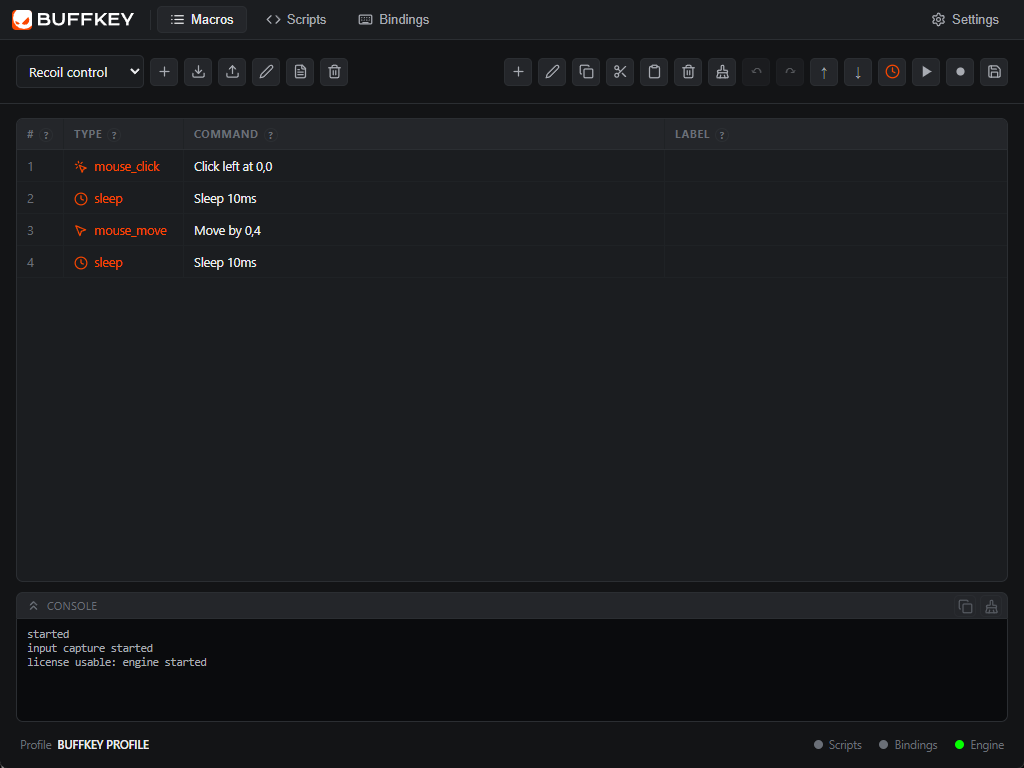
Add Mouse Move (Offset) and enter 0, 4. The first number is horizontal, the second
is vertical; positive Y moves down.
Close the loop
Add a second Sleep at 10 ms, then bind the macro to a mouse button with the hold mode. Test with F7, activate with F8, and keep F11 ready as the stop.
Bind the macro to the left mouse button
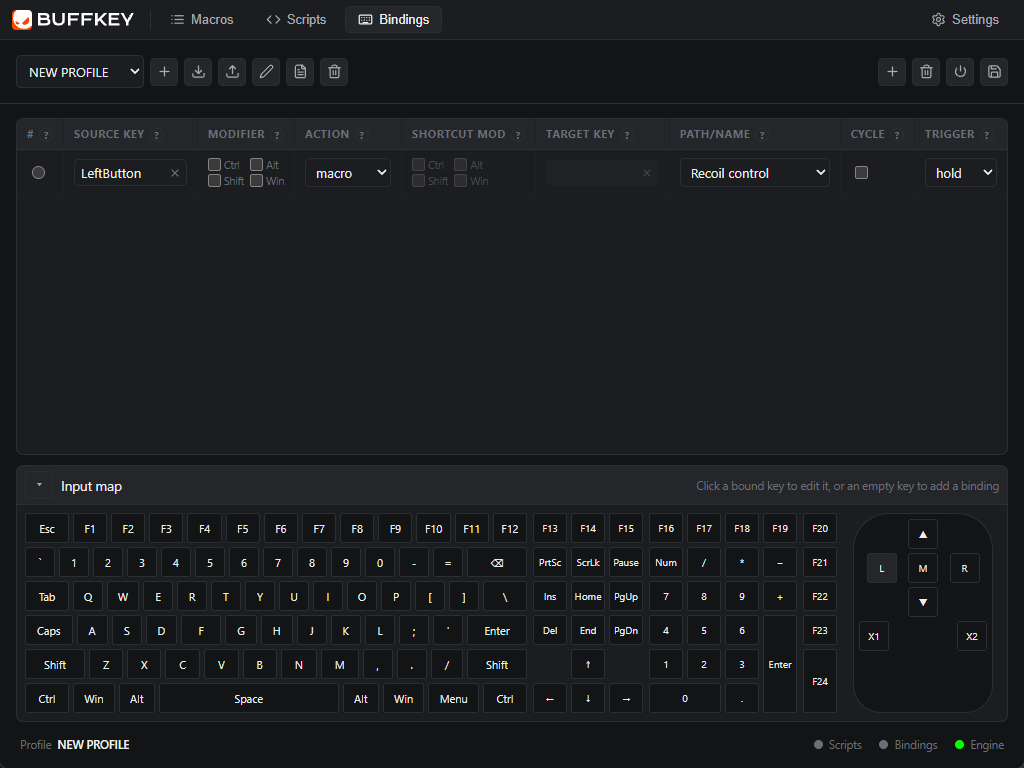
Open Bindings, add the recoil macro, set the source to Left Button, and choose
hold as the trigger mode. The loop starts when you press the trigger and stops the
moment you let go, so the pull covers the whole burst instead of a fixed number of
shots. Leave menu and building macros on click bindings so a held button cannot repeat
a purchase or a placement.
BuffKey ignores the clicks a macro sends, so binding the recoil loop to the same button it clicks does not make it retrigger itself.
Tune in this order
- Pick a weapon and a sensitivity. 2. Set the pause. 3. Adjust the vertical pull. 4. Add horizontal movement only if the pattern drifts sideways.
What it cannot do
A recoil macro does not remove recoil, track a target, or adapt to a weapon you swap mid-fight. It compensates for a pattern you have already measured. If the game patches the recoil, the macro will be wrong until you retune it, and if the weapon has a random horizontal component, a fixed pull will only cover the average.
That is also the honest case for using one: it makes a predictable pattern consistent, so your burst lands closer to where you aimed. It does not make a weapon laser-accurate, and it is not a substitute for learning the pattern.
For a game-specific example, see the ROB RUN recoil section. The same loop shape works in GTA 5 / FiveM and AION 2 once you retune the numbers.
New to the editor? The guide walks through commands, pauses, and bindings from the first macro.